Add Level panel
The Add Level panel allows you to incorporate extra levels to your selected building in iClone, complete with the building style of your preference and customized settings.
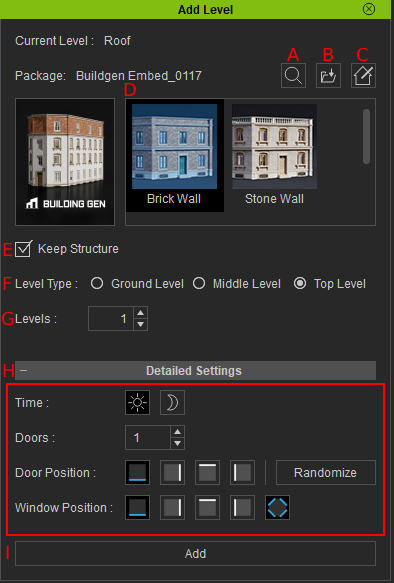
|
UI |
Name | Function |
|
A |
Search Smart Gallery |
Uses the Smart Gallery search function to find BuildingGen configuration files. |
|
B |
Load iBuildingConfig |
Imports a selected iBuildingConfig file into BuildingGen. |
|
C |
Custom Style |
Opens the Custom Style panel for stylizing the buildings. |
|
D |
Building Styles |
Presents various building styles that are accessible in the loaded configuration file. |
|
E |
Keep Structure |
When enabled, the Detailed Settings will be disabled, and the selected level structure will be identical to the newly added levels. |
|
F |
Level Type |
Select from three distinct building level types, each with its unique sets of part props. |
|
G |
Levels |
The number of additional levels you want to add to your building. |
|
H |
Detailed Settings |
Allows for adjustments to the Time of day, Window Positions, Door Positions, and the number of Doors. |
|
I |
Add |
Adds extra level(s) on top of the selected level. |
